vPC VXLAN EVPN Leaf and Spine - Fabric VPC Peering
There are some pretty cool enhancements when it comes to vPC on the Cisco Nexus platform. One of them is being able to form a vPC relationship using the fabric instead of using dedicated links between the switches. Historically, a port-channel with a couple of high-bandwidth links are used between vPC peers.
Wouldn't it be cool if we could utilise the high-speed connections we already have up to the spines?
Now, first things first. Using vPC in this manner may reduce cost in terms of having more SFPs to purchase etc. However, we must ensure we understand the potential risks of using the Fabric underlay. vPC has protections against split-brain scenarios. However, its not 100% bulletproof. So if you have routing wobbles in your underlay, you could see disruption between the vPC members.
This is effectively what Cisco ACI uses. As anyone who uses ACI will know, there are no connections between Leaves when they are in vPC protection groups.
With that disclaimer out of the way. The main goal here is to move the peer link into the fabric. You have a few options regarding the keepalive:
- Continue using a (slower) physical connection between peers. Ideally in a separate VRF
- Use mgmt0 IP addressing and management switching
- Use loopbacks in the underlay to fully utilise the underlay fabric
Those are our options. As this guide is about fully using the fabric. Ill show you using loopbacks. Which we should already have setup on our VTEPs.
This is our topology:
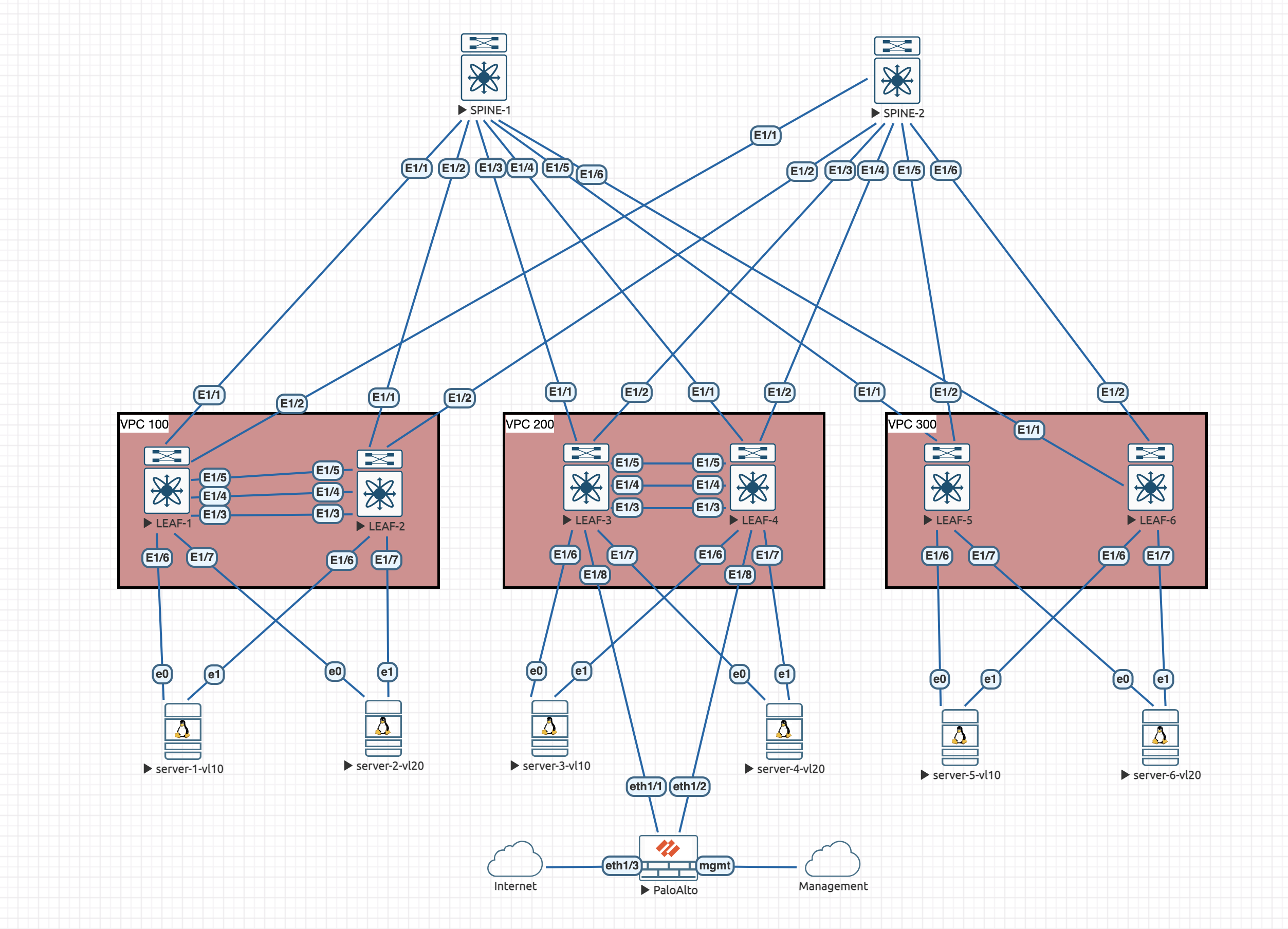
LEAF-5 and LEAF-6 are the ones I am going to demo this config on. As you can see by them not having any links between them.
QoS Configuration
The first thing we need to do is ensure that the fabric will prioritise this traffic. If we are using busy fabric links, we want to make sure we aren't going to end up dropping vPC CFS (Cisco Forwarding Services) packets that are used to control vPC.
On the spines, we need to configure QoS:
class-map type qos match-all CFS
  match dscp 56
exit

policy-map type qos CFS
  class CFS
    set qos-group 7
Then attach this to the fabric interfaces towards the VTEPs on the spines. In this example its Eth1/5 and Eth1/6 on each spine:
interface eth1/5-6
  service-policy type qos input CFS
This will ensure that the CFS traffic is treated as critical.
vPC Keepalive Configuration
We are going to utilise the underlay for the keepalive peering just as an example. As the keepalive is the last line of defense for split-brain, its normally not a great idea doing this if you can run a cable between the peers. Even if you can't using the mgmt0 interfaces would suffice.
We already have a loopback0 on our VTEPs for routing peerings. We can use that for the keepalive peering.
LEAF-5:
feature vpc
feature lacp

vpc domain 300
  peer-switch
  peer-keepalive destination 10.0.0.8 source 10.0.0.7 vrf default
  peer-gateway
  ip arp synchronize
LEAF-6:
feature vpc
feature lacp

vpc domain 300
  peer-switch
  peer-keepalive destination 10.0.0.7 source 10.0.0.8 vrf default
  peer-gateway
  ip arp synchronize
Verification shows we have working keepalives:
leaf-5# show vpc brief | inc keep-alive
vPC keep-alive status             : peer is alive
leaf-6# show vpc brief | inc keep-alive
vPC keep-alive status             : peer is alive
Virtual Peer Link Configuration
As we have used the loopback0 interface for the keepalive. We shouldn't use it for the peer link too. The only other loopback we have is the VTEP loopback and we cannot use that either.
So lets create a new loopback on LEAF-5 and LEAF-6"
LEAF-5:
interface loopback2
  ip address 10.0.2.5/32
  ip router ospf UNDERLAY area 0.0.0.0
  ip pim sparse-mode
  no shutdown
LEAF-6:
interface loopback2
  ip address 10.0.2.6/32
  ip router ospf UNDERLAY area 0.0.0.0
  ip pim sparse-mode
  no shutdown
Now we can configure the vPC domain and peer link:
LEAF-5:
vpc domain 300
  virtual peer-link destination 10.0.2.6 source 10.0.2.5 dscp 56

interface port-channel1
  switchport mode trunk
  spanning-tree port type network
  vpc peer-link
LEAF-6:
vpc domain 300
  virtual peer-link destination 10.0.2.5 source 10.0.2.6 dscp 56

interface port-channel1
  switchport mode trunk
  spanning-tree port type network
  vpc peer-link
port-channel1 is an empty port-channel with no members. You can use any po number you want, it just needs to have no members. Its effectively a phantom port.
Last thing we need to do, is tell the switch which ports face the fabric, that is, ports that go up to the spines.
As this is the same for all VTEPs, its the same config on both of the leaves:
interface Ethernet1/1-2
  port-type fabric
Verification and closing comments
That should be all the configuration we need to setup the vPC over the fabric. We can run some show commands to verify:
leaf-5# show vpc
Legend:
                (*) - local vPC is down, forwarding via vPC peer-link

vPC domain id                     : 300
Peer status                       : peer adjacency formed ok
vPC keep-alive status             : peer is alive
Configuration consistency status  : success
Per-vlan consistency status       : success
Type-2 consistency status         : success
vPC role                          : primary
Number of vPCs configured         : 2
Peer Gateway                      : Enabled
Dual-active excluded VLANs        : -
Graceful Consistency Check        : Enabled
Auto-recovery status              : Disabled
Delay-restore status              : Timer is off.(timeout = 30s)
Delay-restore SVI status          : Timer is off.(timeout = 10s)
Delay-restore Orphan-port status  : Timer is off.(timeout = 0s)
Operational Layer3 Peer-router    : Disabled
Virtual-peerlink mode             : Enabled

vPC Peer-link status
---------------------------------------------------------------------
id    Port   Status Active vlans
--    ----   ------ -------------------------------------------------
1     Po1    up     1,10,20,998-999


vPC status
----------------------------------------------------------------------------
Id    Port          Status Consistency Reason                Active vlans
--    ------------  ------ ----------- ------                ---------------
2     Po2           up     success     success               10


3     Po3           up     success     success               20


Please check "show vpc consistency-parameters vpc <vpc-num>" for the
consistency reason of down vpc and for type-2 consistency reasons for
any vpc.
All that looks good. We can also see the downstream vPCs are functional too.
All the consistency checks are showing success too. So looks good!
Doing a packet capture, the DSCP value of 56 is seen on CFS traffic:
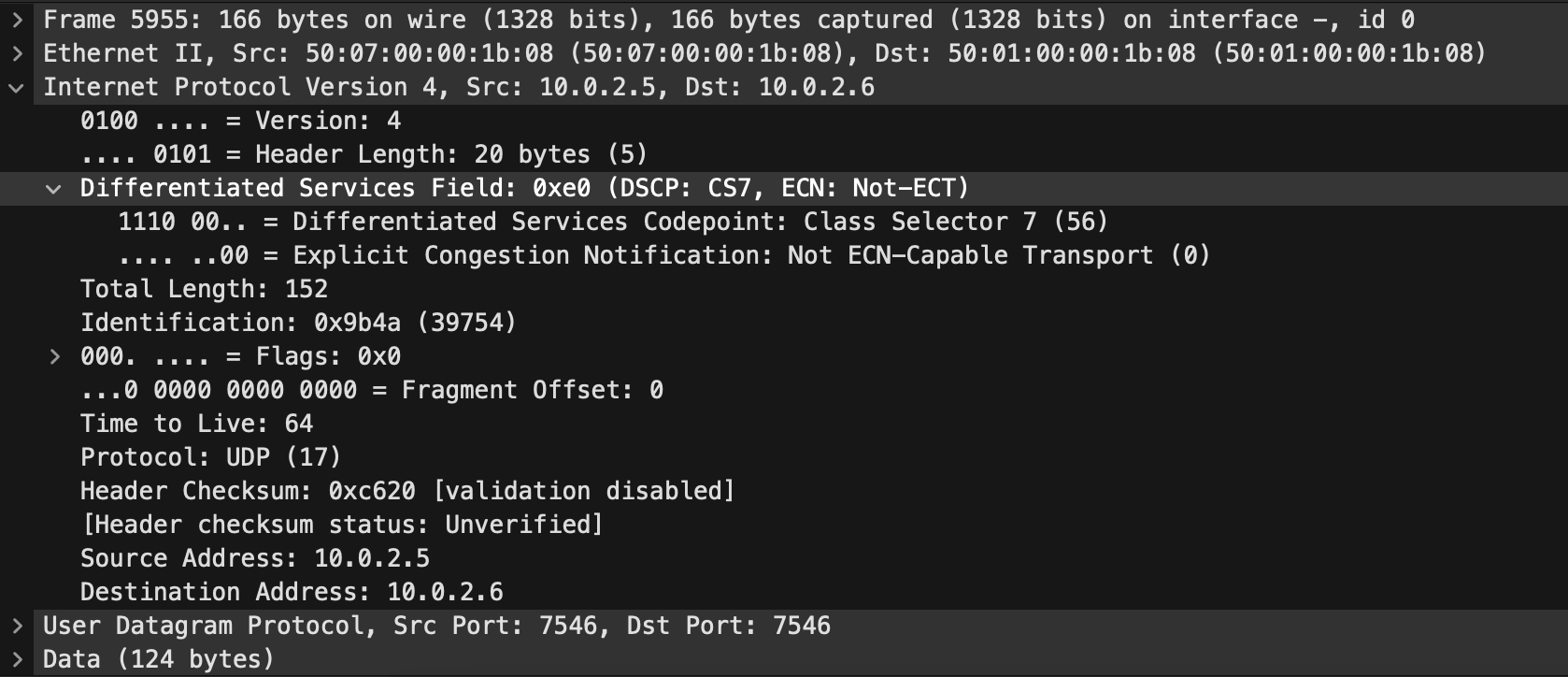
It's worth noting that when using vPC fabric peering, infra-vlans are no longer required. This is because we are using the fabric for the peering, therefore there is no way to create a backup connection. Also, you MUST use advertise virtual-rmac (NVE) and advertise-pip (BGP) when doing this peering type. This ensures that the shared components are advertised.